AI image generation has become more accessible as creative tools continue to improve. Stable Diffusion remains one of the most popular open-source image-generation technologies, giving users extensive control over models, workflows, extensions, and generation settings. Managing these components, however, can become complicated when multiple applications, models, and dependencies are involved.
Stability Matrix is designed to make local AI image generation easier to manage. Its interface brings different Stable Diffusion-related packages and environments into one place, helping users install, organize, launch, and maintain their preferred image-generation tools without handling every technical setup manually.
What Is Stability Matrix?
Stability Matrix is a package manager and launcher for AI image-generation software. It helps users manage popular Stable Diffusion interfaces and related packages from a centralized application.
Read More: Does Stability Matrix support ComfyUI?
Instead of manually downloading repositories, creating Python environments, installing dependencies, and troubleshooting package conflicts, users can rely on Stability Matrix to simplify much of the process.
The platform is particularly useful for people who want to experiment with different AI image-generation interfaces while keeping their installations organized.
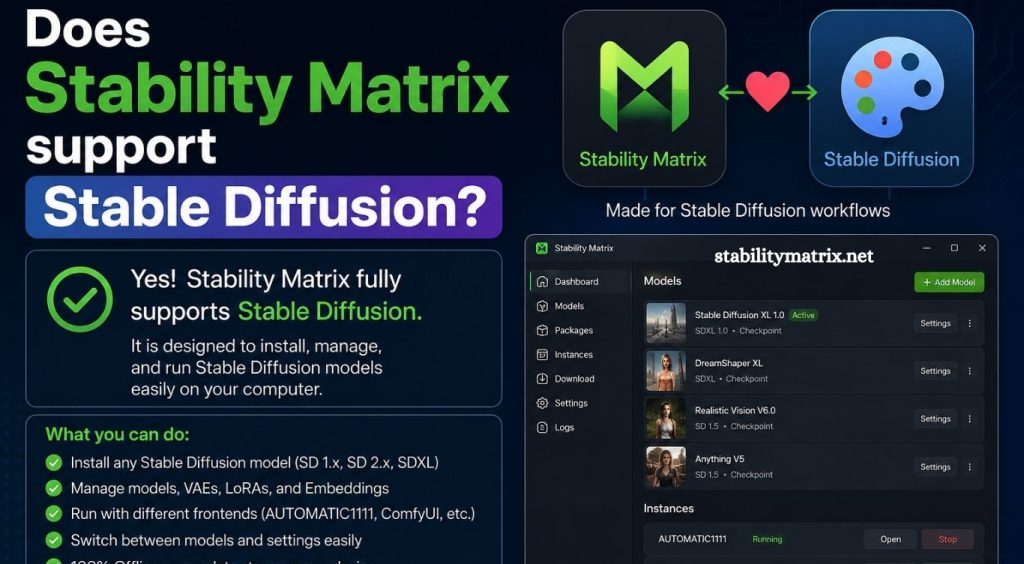
Does Stability Matrix Support Stable Diffusion?
Yes, Stability Matrix supports Stable Diffusion-based applications and workflows.
Stability Matrix does not function as a Stable Diffusion model itself. Instead, it acts as a management platform for installing and running software that uses Stable Diffusion and related AI image-generation technologies.
Depending on the available packages and versions, users can manage interfaces such as Stable Diffusion WebUI and other popular AI image-generation platforms through Stability Matrix.
This approach makes Stability Matrix useful for beginners who want a simpler installation process and experienced users who need multiple environments.
How Stability Matrix Works With Stable Diffusion
Stable Diffusion normally requires several components to work correctly. These can include Python, required libraries, model files, extensions, configuration settings, and a compatible graphics environment.
Stability Matrix helps organize these components by managing individual packages and their environments.
A typical workflow involves installing Stability Matrix, selecting a supported package, allowing the application to configure the required environment, and then launching the selected interface.
Once the Stable Diffusion interface is running, users can work with their preferred models and generation settings from that interface.
Stable Diffusion Packages in Stability Matrix
One of the main advantages of Stability Matrix is its support for multiple AI image-generation packages.
Users can install different interfaces without manually configuring every environment from scratch. This becomes valuable when experimenting with different workflows.
For example, one interface may provide a traditional Stable Diffusion WebUI experience, while another may focus on node-based workflows or newer image-generation technologies.
The exact packages available can change as projects receive updates, so users should check the current Stability Matrix package catalog when installing a specific interface.
Can You Install Stable Diffusion Models Through Stability Matrix?
Stability Matrix can help manage the environment where Stable Diffusion applications run, but model management depends on the selected package and workflow.
Stable Diffusion models commonly use formats such as .safetensors and .ckpt. After obtaining a compatible model, users generally place it in the appropriate model directory used by their selected interface.
Some Stability Matrix configurations make it easier to share resources between packages, reducing the need to maintain duplicate model files.
This can save storage space when working with several Stable Diffusion interfaces.
Why Use Stability Matrix for Stable Diffusion?
Installing Stable Diffusion manually can involve several technical steps. Stability Matrix reduces much of that complexity by providing centralized environment and package management.
Easier Installation
New users can avoid many command-line installation steps. Stability Matrix handles much of the environment setup required by supported packages.
Multiple Interfaces
Users can maintain several AI image-generation interfaces on the same computer. This makes experimentation more convenient.
Organized Environments
Different packages can maintain their own environments, helping reduce conflicts between dependencies.
Simplified Updates
Managing AI software manually can make updates difficult. Stability Matrix provides a central location for managing supported packages and their installations.
Shared Resources
Depending on the configuration, users can organize models and other resources efficiently across multiple installations.
Stability Matrix vs Manual Stable Diffusion Installation
A manual Stable Diffusion installation gives advanced users significant control over the environment. However, it also requires more technical knowledge.
Users may need to work with Git, Python environments, dependencies, command-line commands, GPU drivers, extensions, and configuration files.
Stability Matrix provides a more convenient alternative by placing many management functions inside one application.
For beginners, this can significantly reduce the learning curve. Advanced users may still prefer manual installation when they require highly customized environments or unusual configurations.
What Hardware Is Needed?
Stable Diffusion performance depends heavily on the hardware used by the computer.
A dedicated NVIDIA GPU with sufficient VRAM is generally preferred for local AI image generation. More VRAM allows users to work with larger models, higher resolutions, and more demanding workflows.
System RAM and available storage also matter. AI models can consume substantial disk space, particularly when users maintain multiple checkpoints, LoRAs, VAEs, ControlNet models, and other resources.
Stability Matrix itself does not remove Stable Diffusion’s hardware requirements. It mainly simplifies software and environment management.
Does Stability Matrix Work With Stable Diffusion XL?
Yes, Stable Diffusion XL, commonly called SDXL, can be used through supported Stable Diffusion interfaces managed by Stability Matrix.
SDXL models require compatible software and appropriate workflows. Once a compatible interface has been installed, users can add SDXL models according to that interface’s model-directory structure and configuration.
Performance will depend on the computer’s GPU, VRAM, RAM, model settings, and generation resolution.
Does Stability Matrix Support Stable Diffusion 3?
Support for newer Stable Diffusion generations depends on the specific package and version available through Stability Matrix.
Stable Diffusion ecosystems change quickly, with interfaces frequently adding support for new models and technologies. Users should therefore verify compatibility within the current package version before installing a particular model.
This package-based approach is one of Stability Matrix’s useful features because users can select an interface based on the workflow and model support they need.
Common Problems When Using Stability Matrix With Stable Diffusion
Although Stability Matrix simplifies installation, users can still encounter problems.
GPU driver issues can prevent applications from using hardware acceleration correctly. Incompatible models can also cause errors when loaded into an interface that does not support their architecture.
Extensions may introduce dependency conflicts, while outdated packages can create compatibility problems after updates.
Insufficient VRAM is another common issue. Large models and high-resolution generation can require more memory than the GPU provides.
Keeping GPU drivers, packages, extensions, and models compatible can help prevent many of these problems.
Is Stability Matrix Good for Beginners?
Stability Matrix can be a strong option for beginners interested in local Stable Diffusion.
The biggest advantage is convenience. Instead of learning every installation command immediately, users can start with a graphical management interface and explore different packages.
Beginners should still understand basic concepts such as models, checkpoints, LoRAs, VAE files, VRAM, and image-generation settings. Learning these fundamentals makes troubleshooting and workflow customization much easier.
Is Stability Matrix Useful for Advanced Users?
Advanced users can also benefit from Stability Matrix, especially when managing multiple AI image-generation environments.
Testing different interfaces can become time-consuming when each application requires a separate installation. Centralized package management can make experimentation faster and keep projects better organized.
However, users who require highly customized dependencies or development environments may still prefer direct installation and manual configuration.
Conclusion
Stability Matrix provides a convenient way to manage software used for Stable Diffusion and other local AI image-generation workflows. Rather than replacing Stable Diffusion, it works as a management layer that simplifies package installation, environment organization, and application launching.
Pingback: Can Stability Matrix manage AI models? - stabilitymatrix