
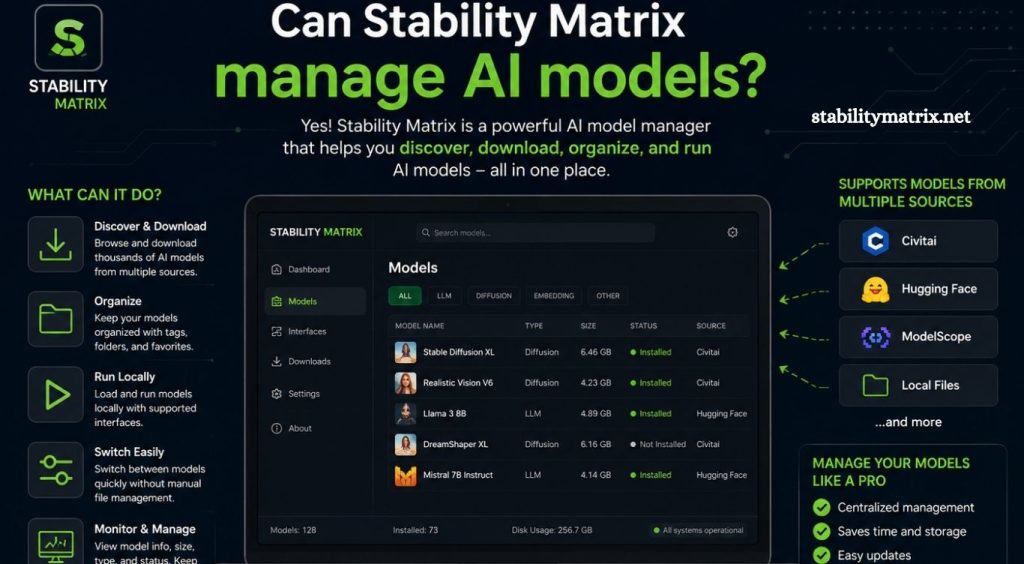
AI model management has become an important part of modern image-generation workflows. As more open-source AI models, checkpoints, extensions, and generation tools become available, keeping everything organized can quickly become difficult. Users often work with multiple applications, model versions, and supporting files, making a centralized management system increasingly useful.
Stability Matrix provides a streamlined environment for managing AI applications and their related resources. Its interface is designed to simplify installation, organization, updates, and access to different AI tools from one place. This approach can make complex AI workflows easier to maintain, especially for users who regularly experiment with different models and generation platforms.
What Is Stability Matrix?
Stability Matrix is an AI software management platform designed to help users install and manage several popular AI image-generation applications. Instead of configuring every application separately, users can manage supported packages through a centralized interface.
Read More: Does Stability Matrix support Stable Diffusion?
The platform is particularly useful for Stable Diffusion workflows. Users can install supported interfaces, manage environments, organize model files, and switch between different AI applications without maintaining every installation manually.
Its main purpose is convenience. Rather than replacing AI models themselves, Stability Matrix provides an organized environment for working with the applications and resources needed to run them.
How AI Model Management Works in Stability Matrix
AI models can require significant storage space and may be shared between different applications. Manually maintaining duplicate model files can waste disk space and make workflows harder to manage.
Stability Matrix can help organize model resources through a centralized model-management approach. Depending on the supported application and configuration, users can maintain model files in locations that can be accessed by compatible packages.
This approach can reduce unnecessary duplication and make it easier to identify available models.
For example, a user may have several Stable Diffusion checkpoints, LoRAs, VAEs, and other supporting resources. Instead of searching through separate application folders, centralized organization can provide a clearer view of the resources available for the workflow.
Managing Stable Diffusion Models
Stable Diffusion users commonly work with different types of AI model files. Checkpoints are used as the primary models for generating images, while LoRAs can modify styles, characters, objects, or visual characteristics.
Stability Matrix can make managing these resources more convenient by providing a structured environment for supported AI applications. Users can keep their models organized while using different interfaces for image generation.
Model management becomes especially useful when experimenting with multiple checkpoints. A user can maintain several models for realistic photography, anime artwork, illustrations, cinematic scenes, or other creative styles without repeatedly downloading the same resources for every application.
Can Stability Matrix Share Models Between Applications?
One of the useful aspects of centralized AI resource management is the ability to reduce duplicated model files.
Different AI interfaces may use similar model resources. Without centralized organization, each application can create its own model directory, potentially resulting in multiple copies of large files.
Stability Matrix is designed to help manage shared resources for compatible packages. This can make switching between supported AI applications more efficient while reducing unnecessary storage requirements.
Compatibility still depends on the model type, application, directory configuration, and software version. Users should check the requirements of each application before moving or linking model files.
Managing Different AI Model Types
Modern AI workflows involve more than traditional checkpoints. Users may work with LoRAs, embeddings, VAEs, ControlNet models, upscalers, and other supporting resources.
A well-organized model library can make these resources easier to locate and maintain. Stability Matrix can serve as a central point for managing resources used by supported AI applications.
The exact folder structure and compatibility can vary between applications. Proper organization is important because placing a model in the wrong directory may prevent an AI interface from detecting it.
Installing AI Applications Through Stability Matrix
Another major advantage of Stability Matrix is application management. Users can install supported AI packages through the platform instead of manually configuring every dependency.
This can simplify the initial setup process, particularly for beginners who may find Python environments, dependencies, repositories, and configuration files confusing.
Once applications are installed, Stability Matrix provides a centralized way to access them. Users can maintain multiple AI interfaces while keeping their overall workflow organized.
Updating AI Applications and Resources
AI software develops quickly. New versions can introduce performance improvements, features, bug fixes, and compatibility changes.
Managing applications individually can become time-consuming when several installations are involved. Stability Matrix can simplify package management by providing a centralized interface for supported applications.
Users should still review updates before installing them. Major changes can sometimes affect extensions, custom workflows, model compatibility, or existing configurations.
Keeping backups of important workflows and configurations is a smart practice before making significant updates.
Advantages of Using Stability Matrix for AI Models
Stability Matrix can provide several practical benefits for AI users. Centralized organization can make large model libraries easier to maintain, while shared resources can help reduce unnecessary duplication.
The platform can also simplify the installation of supported AI applications. Beginners can benefit from having fewer manual configuration steps, while experienced users can use the centralized environment to manage multiple workflows.
Another advantage is convenience. Instead of navigating multiple installation folders and remembering separate application configurations, users can manage supported tools from a unified interface.
Limitations to Consider
Stability Matrix is not a universal AI model manager for every AI application. Its usefulness depends on the applications and resources supported by the platform.
Some models may require manual placement or configuration. Certain extensions may also have specific installation requirements that are outside Stability Matrix’s automated management capabilities.
Hardware requirements remain another important consideration. Stability Matrix does not eliminate the need for suitable GPU resources, sufficient VRAM, storage space, or compatible drivers.
Users should also avoid assuming that every model works with every AI interface. Model architecture and application compatibility should always be checked before installation.
Is Stability Matrix Useful for Beginners?
Stability Matrix can be particularly helpful for beginners entering the local AI image-generation space. Installing AI applications manually can involve several technical steps, including dependency management and folder configuration.
A centralized management interface can make these processes easier to understand. Beginners can start with supported applications and gradually learn how models, extensions, and workflows interact.
Experienced users can also benefit from the organization provided by centralized package and model management.
Tips for Better AI Model Organization
A clear naming system can make a large model library much easier to navigate. Users should consider organizing models according to their type, architecture, style, or intended purpose.
Keeping unnecessary duplicates removed can also save significant storage space. Large AI checkpoints can occupy several gigabytes, so an unmanaged library can quickly consume available disk space.
Users should also keep important models and workflows backed up. AI software updates and configuration changes can occasionally cause compatibility problems, making backups valuable for restoring a working setup.
Conclusion
Stability Matrix can make AI model management more organized by bringing supported AI applications, environments, and model resources into a centralized workflow. Its biggest value comes from reducing manual setup, improving organization, and helping users work with multiple AI applications more efficiently.
Pingback: Is Stability Matrix safe to download? - stabilitymatrix