
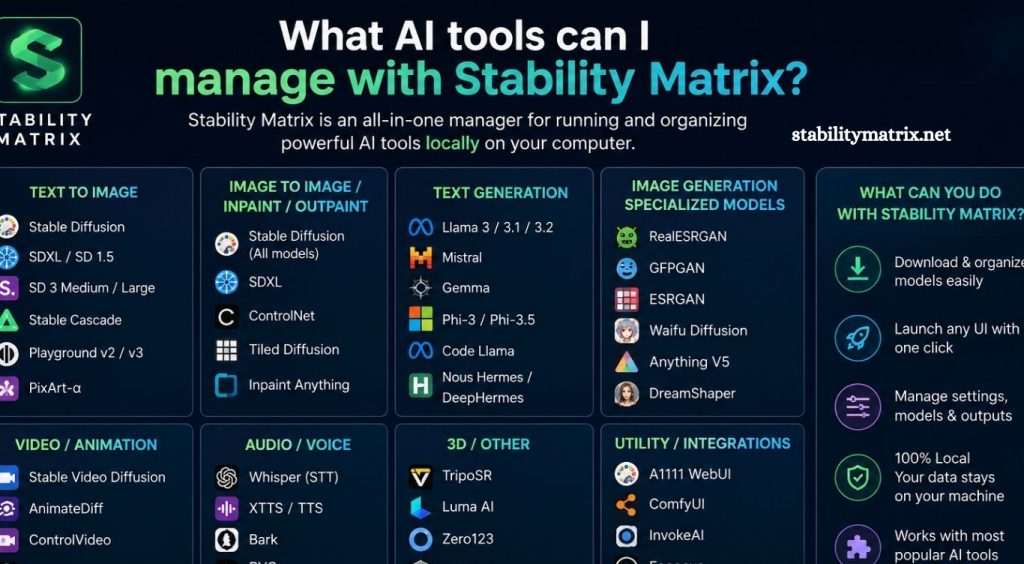
AI-powered image generation has changed the way creators approach digital art, concept development, design, and visual experimentation. Instead of relying on a single application, users can work with different open-source AI models and interfaces for specific creative tasks. Managing these tools individually, however, can become difficult when installations, models, updates, dependencies, and storage requirements start adding up.
Stability Matrix offers a practical way to organize multiple AI image-generation environments from one application. Its centralized approach helps users install supported packages, manage models, configure environments, and switch between different AI interfaces without maintaining every setup manually.
What Is Stability Matrix?
Stability Matrix is a desktop application designed to simplify the installation and management of AI image-generation tools. It provides a centralized interface where users can install supported packages, manage models, organize environments, and launch different AI applications.
Read More: How do I install Stability Matrix?
The platform is particularly useful for users who experiment with several Stable Diffusion-based interfaces. Instead of downloading each project separately and managing dependencies through different installation methods, Stability Matrix can keep supported tools organized within one workspace.
AI Tools Supported by Stability Matrix
Stability Matrix can manage several popular AI image-generation interfaces. Support can change as projects receive updates, so the exact package availability may vary between Stability Matrix releases.
Stable Diffusion WebUI
AUTOMATIC1111 Stable Diffusion WebUI is one of the most widely recognized interfaces in the Stable Diffusion ecosystem.
Stability Matrix can simplify its installation and environment management. Users can access features such as model selection, text-to-image generation, image-to-image generation, ControlNet integrations, extensions, and advanced generation settings.
ComfyUI
ComfyUI uses a node-based workflow system for AI image generation.
It provides extensive control over generation pipelines. Users can connect different nodes for models, prompts, samplers, image processing, conditioning, and other operations.
Stability Matrix can make ComfyUI easier to install and maintain alongside other AI applications.
InvokeAI
InvokeAI provides a polished interface for AI image creation and editing. It focuses on creative workflows while providing tools for image generation, inpainting, canvas editing, and model management.
Running InvokeAI through Stability Matrix allows users to keep its environment alongside other supported AI tools without creating completely separate manual setups.
Fooocus
Fooocus is designed for users who want a simpler image-generation experience.
Compared with highly customizable interfaces, Fooocus emphasizes accessibility and streamlined generation. Stability Matrix can help users install and manage Fooocus as part of a broader AI toolkit.
SD.Next
SD.Next is another interface designed for advanced Stable Diffusion workflows.
It provides support for different models and generation technologies while offering extensive configuration options. Users who need greater flexibility can keep SD.Next available through their Stability Matrix environment.
Why Manage Multiple AI Tools?
Different AI interfaces are designed around different workflows. One application may provide better control over complex node-based pipelines, while another may offer a simpler interface for quick image generation.
Managing several tools gives creators more flexibility. A designer might use ComfyUI for advanced workflows, Fooocus for fast generations, and InvokeAI for image editing.
Stability Matrix makes this multi-tool approach easier by bringing supported environments into one management system.
Model Management With Stability Matrix
AI image-generation applications depend heavily on models. Checkpoints, LoRAs, VAEs, ControlNet models, and other files can consume significant storage space.
Managing these resources separately can result in duplicated files and confusing folder structures. Stability Matrix provides centralized model-management capabilities that can help users organize compatible models across supported packages.
This approach can reduce unnecessary duplication and make it easier to locate models when switching between applications.
Package Installation and Updates
Installing AI tools manually often involves Python environments, dependencies, Git repositories, runtime components, and configuration files. A small compatibility problem can prevent an application from launching correctly.
Stability Matrix reduces much of this complexity by providing package installation and management through its interface. Users can install supported AI applications without manually repeating every setup step.
Updates can also be easier to manage because packages are organized within the same application.
GPU and Hardware Considerations
Stability Matrix does not eliminate hardware requirements. AI image generation remains dependent on available system resources, particularly GPU memory.
NVIDIA GPUs with suitable CUDA support are commonly used for demanding Stable Diffusion workflows. Some applications and configurations can also work with AMD, Intel, or Apple hardware, although compatibility and performance depend heavily on the specific tool and operating system.
Before installing multiple packages, users should consider available VRAM, system RAM, storage capacity, and GPU drivers.
Stability Matrix for Beginners
Stability Matrix can be useful for beginners because it reduces the amount of manual setup required.
A new user can start with a relatively simple interface and later install more advanced tools as their experience grows. This makes it possible to explore different AI workflows without immediately learning command-line installation processes.
The centralized interface also makes switching between applications more convenient.
Stability Matrix for Advanced Users
Experienced AI creators can benefit from Stability Matrix for a different reason: organization.
Advanced users often maintain multiple models, custom workflows, extensions, and AI interfaces. Keeping everything structured can become challenging over time.
Stability Matrix provides a single management layer for supported packages, helping users maintain different environments while keeping their AI toolkit organized.
Storage Management Matters
AI models can occupy several gigabytes each, and maintaining multiple applications can quickly increase storage requirements.
Users should keep enough free space for applications, models, temporary files, generated images, and workflow resources. A dedicated SSD can improve loading times and make large AI libraries easier to manage.
Centralized model storage can also help prevent unnecessary copies of identical resources.
Common Uses for Stability Matrix
Stability Matrix can support several creative workflows, including AI art generation, concept development, image editing, character design, product visualization, experimental photography, and custom AI workflows.
Its biggest advantage comes from combining multiple applications rather than depending on one interface.
Is Stability Matrix Worth Using?
Stability Matrix can be a strong choice for users who want to work with multiple AI image-generation applications on the same computer.
Its centralized package management, model organization, and environment handling can reduce the complexity associated with maintaining several separate installations. Beginners can benefit from easier setup, while advanced users can use it to organize a more sophisticated AI workflow.
The main consideration is hardware capacity. Running multiple AI packages does not mean every model can run simultaneously. GPU memory, RAM, storage, and application compatibility still determine overall performance.
Conclusion
Stability Matrix provides a convenient management layer for users exploring the growing ecosystem of AI image-generation tools. Supported applications such as Stable Diffusion WebUI, ComfyUI, InvokeAI, Fooocus, and SD.Next can serve very different creative purposes, making a centralized environment valuable for experimentation.
Pingback: Does Stability Matrix support ComfyUI? - stabilitymatrix